Search for the E2BET app and Google Play shows nothing, while the results fill up with APK download sites we have nothing to do with. Installing the wrong file can put malware on the same phone that holds your bKash or Nagad wallet. This page explains where our real APK comes from, how to install it step by step, what the app can do, and what iPhone users can use instead.
What is the E2BET app?
The E2BET app is our Android application, delivered as an APK file from our official website. It puts our sportsbook, casino, payments and live streaming on your phone.
It is a slightly streamlined version of our desktop site, with everything essential included. You can deposit and withdraw, claim bonuses, place pre-match and live bets, and watch live streams. Your account works on both the app and the website. Deposits in the app use the same payment methods, including bKash and Nagad.
| Option | Devices | Where you get it | Updates |
|---|---|---|---|
| Android app (APK) | Android phones and tablets | Our official website | Automatic |
| Home-screen shortcut | iPhone and iPad | Safari, Add to Home Screen | Always current (it’s our website) |
| Mobile browser | Any phone | Your bookmark of our site | Always current |
How do you install the E2BET APK on Android?
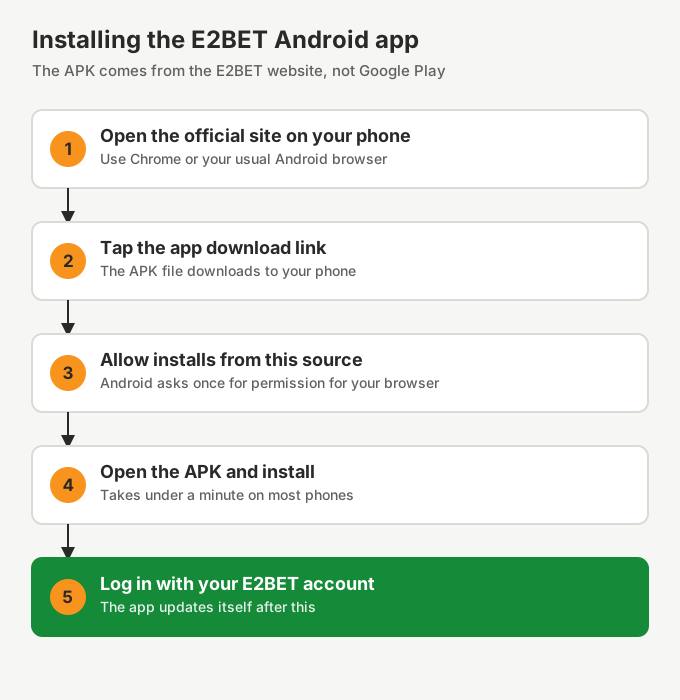
Open our official site on your phone, tap the app download link, allow your browser to install apps, open the downloaded file and tap Install. Then log in.
- Open our official site on your phone. Use your verified bookmark, not a download portal.
- Tap the app download link. The APK file saves to your Downloads folder.
- Allow the install. Android shows a prompt the first time. Tap Settings, then allow installs from your browser.
- Install the app. Open the APK from your notifications or Downloads and tap Install.
- Log in. Use your existing E2BET username and password, or create an account in the app.
Once the app is installed, you can switch the "install unknown apps" permission back off for your browser. The app keeps itself up to date.
Why isn’t E2BET on the Google Play Store?
Google Play only allows real-money gambling apps in countries where it has approved them, from locally licensed operators. So we distribute our Android app directly from our website.
Any "E2BET" app you find on Google Play is not ours. Please don’t install it.
Should you download the latest or an old E2BET APK?
Always the latest, and only from our official site. Old versions on third-party sites miss our security fixes and may have been altered.
People look for old APKs when the new one won’t install or the app crashes. The cause is usually low storage or an unfinished download. Free up some space, delete the broken file, and download again from our site. Still stuck? Our 24/7 live chat can help.
Is there an E2BET app for iPhone?
We don’t currently offer an iOS app. On iPhone, add our mobile site to your home screen and it opens in one tap, just like an app.
- Open your bookmark of our site in Safari.
- Tap the Share button.
- Choose Add to Home Screen and tap Add.
Ignore anything that offers an "E2BET iOS APK". APK files only run on Android, so that offer is fake.
Frequently asked questions
Is the E2BET app free?
Yes. Our Android app is free to download from the official E2BET website.
Is E2BET on the Google Play Store?
No. Google Play only allows real-money gambling apps in approved countries, so we distribute our Android app as an APK from our own website. Any E2BET app on Google Play is not ours.
Is there an E2BET app for iPhone?
We don’t currently offer an iOS app. On an iPhone, open our site in Safari, tap Share, then Add to Home Screen for one-tap access.
Is it safe to download an old version of the E2BET APK?
No. Old APKs on third-party sites may have been modified and don’t receive our security updates. Download the current version from our official site only.
Does the E2BET app update automatically?
Yes. Once installed, the app updates itself.