Most login problems have nothing to do with your password. An address you bookmarked last month may be blocked today, and searching for a new one can lead you to a copy of our site that records whatever you type. This page covers the right login steps on web and app, what to do when they fail, and how to recover a forgotten password safely.
How do you log in to E2BET?
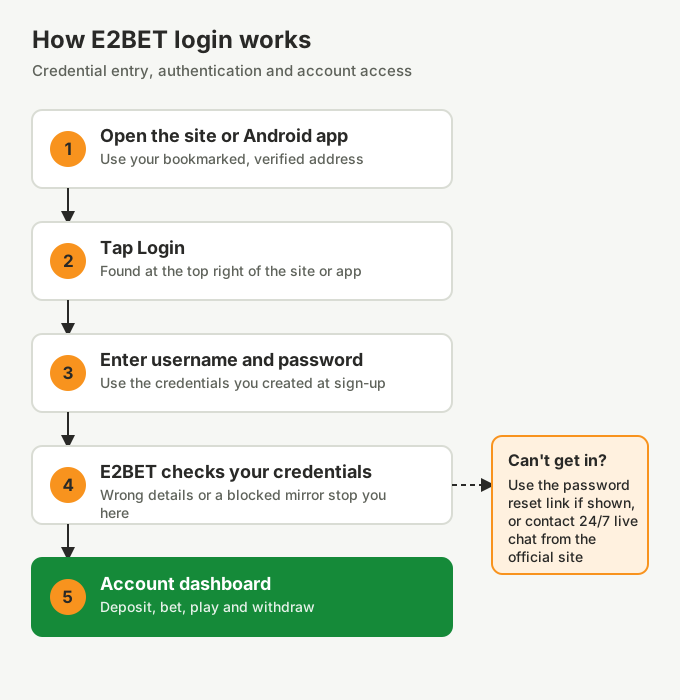
Open our official site, tap Login at the top right, enter your username and password, and tap the login button. You land on your account dashboard.
- Open your bookmark of our site. No bookmark yet? Check our licence footer first.
- Tap Login. It sits next to Sign up at the top right.
- Enter your details. Type the username and password you chose when you registered.
- Confirm. We check your details and open your account.
How do you log in through the E2BET app?
Open the E2BET Android app, tap Login, and enter the same username and password you use on our website. One account works on both.
The app keeps you signed in between sessions, so you usually only log in once per device. If the app won’t accept your details but the website does, your app is probably out of date. Reinstall it from our site using the app download steps.
What should you do if you forget your password?
Use the password reset link on the login form if it is shown. If not, contact our 24/7 live chat, or email [email protected] from your registered email address.
We may ask you to confirm details such as your username, registered email or mobile number. We will never ask for your old password or your bKash or Nagad PIN. Once you are back in, choose a new password you don’t use on any other site. New to E2BET? See how to register.
Why can’t you log in?
The most common causes are a blocked or retired address, mistyped details, an outdated app, or a temporary hold on your account while we verify it.
| What you see | Likely cause | Fix |
|---|---|---|
| Page won’t load | Address blocked or retired | Find our current address, check the licence footer and save a new bookmark |
| "Incorrect username or password" | Typo, caps lock or wrong account | Retype slowly, then use password recovery |
| Works on web, fails in app | Old app version | Reinstall the APK from our site |
| Account locked or restricted | Security check or document request | Contact live chat and complete verification |
| Site looks like ours but has no licence number | Copy site | Leave immediately; change your password on our site if you entered it |
How does VIP login work?
Our VIP Club runs on your normal account, so there is no separate VIP login. If a site offers you a special "E2BET VIP login" page, it is not ours: that is a common phishing trick.
How do you keep your login secure?
- Use a password of at least 12 characters that you don’t reuse anywhere else.
- Log in from your bookmark, never from links in messages or Telegram groups.
- Don’t save your password on shared phones or computers.
- Log out after using public Wi-Fi.
- If you typed your password into a suspicious site, change it on our site straight away and let our support team know.
Frequently asked questions
How do I log in to E2BET?
Open our official site or Android app, tap Login at the top right, and enter your username and password.
Can I log in to E2BET with my phone number?
We register your mobile number at sign-up, but you log in with your username and password. If the form offers a phone option, use the number you registered.
Why does my E2BET login page not open?
The address you saved has probably been blocked or retired. Find our current address, confirm the licence number in the footer, then save a new bookmark.
Is there a separate E2BET VIP login?
No. Our VIP Club runs on your normal account, so you sign in the usual way. Any site offering a special VIP login page is not ours.